Well, the new Mr. Att looks great on white backgrounds:
...but not so good on black ones:
I'd suggest putting a thin white border around the @, just like the black border around the equipment. I'd do it myself but I don't have any of my photo editing software installed on my laptop...
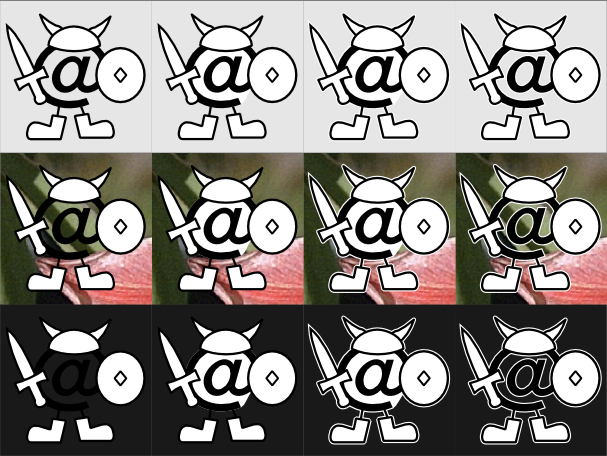
Well, I've got a few variations on trying to make it show up better, against an off-white, a photographic, and an off-black background. The problem with a thin white border around the black is that it tends to look quite jagged at small sizes, but anyway - any thoughts?
(Note that these are all from the SVG source rendered in Inkscape against the various backgrounds, so anti-aliasing, etc, might be done better or worse with other tools)
Well, the new Mr. Att looks great on white backgrounds:
...but not so good on black ones:
I'd suggest putting a thin white border around the @, just like the black border around the equipment. I'd do it myself but I don't have any of my photo editing software installed on my laptop...
At absolute minimum, I'd make the "possible summons" and "do bolts hit monsters rather than player" checks independent of adult_ai_smart. Recall that this is a one-line change in make_attack_spell().
That much is now done. I'm still digesting the rest of your post (and code).
I'm interested in improving the V monster AI but right now am pretty clueless about it. I've been having a scan through Zaiband to see what you're doing there but given I've not really looked into AI much before I'm a little lost. I would be interested in where I could remove adult_ai_smart checks, though.
At absolute minimum, I'd make the "possible summons" and "do bolts hit monsters rather than player" checks independent of adult_ai_smart. Recall that this is a one-line change in make_attack_spell().
The AI in Zaiband 3.0.8 alpha is a work in progress. The damage metaknowledge code is decidedly immature, and the pathfinding needs a severe rewrite (although the minor tweaks I have already done do keep the AI from cheating when moving non-randomly, and solve non-door openers trying to flee through doors.)
* The breath weapon selector is working considerably better, but the game's metaknowledge of resistances is not really there yet.
* Checking for one-spell kills (with the player health bar, whose meaning is changed by smart_cheat i.e. adult_ai_smart) is not fully there yet. Some sort of comparison against melee damage is needed.
* Probability-weighted Magic Missile vs Curse selection is stable.
* Monster fear is not properly rewritten yet. I haven't worked out a proper non-cheating way of handling damage projection from either player missile weapons, or spells/wands/staves/rods.
* It does look like I'll have to adjust the monster move rate display on the sidebar before implementing the triple-speed ghost AI. (I hope this will close a really bad abuse : ambling around at -3 to -6 speed at DL20 and lower. I really should not be able to survive that at all.)
Eradicating the case statement in favor of an array of structs whose initialization is controlled by the preprocessor is a questionable decision at this point. I'm hoping that it'll make later changes to the AI easier.
I might be in the minority (and seem to be), but I like the JRRT monogram over the Mr. Att. The fact that it's Tolkien/Middle Earth (albeit loosely) is one of the reasons I like this game.
All releases since at least late 2.7.x series have had it.
The only thing broken about it is self-healers, and that is because the monster magic system isn't even vaguely symmetric to the player. There's a lot of broken AI that's fixed by turning on ai_smart, so I recommend at least trying playing with it on.
I'm interested in improving the V monster AI but right now am pretty clueless about it. I've been having a scan through Zaiband to see what you're doing there but given I've not really looked into AI much before I'm a little lost. I would be interested in where I could remove adult_ai_smart checks, though.
You also questioned (no) selling in the general store. For the most part, the other shops are restricted to buying things that they could also sell. Would you find value in a general store that could buy only food (not mushrooms), torches, ?WoR, cloaks, shovels, and ammo?
Re-reading chem's initial version of the general store question (halfway down page 1), it appears that he was trying to sell torches and pebbles. Thus, a better defense is needed. These are three weak reasons:
1) Realism: the general store now sells very standardized items. It seems inefficient for the shop to buy a torch with 2658 turns, when they apparently get 3000-turn (or 6000-turn) torches in bulk. I think that you can still get enchanted ammo, so the argument is less relevant for ammo.
2) Little loss: if the general store bought items, they generally would be worth a few gp. You can get 20gp for your 20 (+0+0) pebbles at the BM or the weapon shop. You may not be able to sell torches at the BM, but 1gp for 3lbs is a fairly bad trade.
3) Training: I'm coming around to the argument that selling is dangerous (because it encourages you to slow down your dive). By closing the general store, we make a few more shallow items worthless -- torches in particular. Preventing the sale of torches also encourages players to find other uses for them -- 'F'illing is more important now (with the Phial deeper, lanterns unavailable, and mostly-full torches giving radius-2 light).
bump because I think those comments may have went missed in the other noise.
I didn't comment because most of your points had been rehashed repeatedly since 3.0.9 was released. *Especially* the switch from verb-noun to noun-verb in shops. I hate it. Lots of people on r.g.r.a and here seem to hate it. But Takkaria seems set on it, even though the main defense of noun-verb seems to be "it makes playing with a mouse easier".
Please do not restart that pointless argument.
You also questioned (no) selling in the general store. For the most part, the other shops are restricted to buying things that they could also sell. Would you find value in a general store that could buy only food (not mushrooms), torches, ?WoR, cloaks, shovels, and ammo?
Not selling in the GS is intentional? I'm baffled. It makes it the only store that doesn't buy things, which just seems strange. The black market is still used sometimes to sell things; particularly high value items such as ego armors or weapons, when the corresponding normal store has a low max value shopkeep. I would still like to be able to sell in the GS. This change doesn't seem to add to gameplay.
Another store question: why the change so that purchases in a store must have the item selected before the purchase keystroke? This is different from basically anything I've played before, and also inconsistent with the keystrokes for selling items. To sell: hit 's', pick item. To buy: pick item, hit 'p'. I much preferred the normal, standard, "hit 'p', pick item" routine.
I don't know when that was changed :P
My character just found BoS +9 at 550' from either a snaga or the floor. We'll see how long he lasts.
bump because I think those comments may have went missed in the other noise.
also, that character died to a balrog in a jigsaw GV around 1500'.
Yeah, you're probably exactly right, and I think that's bad/buggy behaviour. When I keymap something, it should use my keymap for the mapped input anywhere in the game, regardless of subcommand. I have another key mapped to 'o' for when I need it. I have no idea how difficult it would be to change this behaviour.
The only problem with what you suggest is that in things like lists, you really want to keep "o" meaning "o". So it makes sense for keymaps not to work in commands, as it is now ("y" and "n" would also be interesting ones!).
Ideally it sounds like you want a way to map specific commands... but that's harder
Click-to-look is one solution to what you suggest, anyway, which is coming soon-ish.
Roustk - ah, good trick with the 1% opaque! I think I only have quite such a problem with the dock because I have mine hidden normally, so windows overlap the "dock area".
Or, maybe the icns file format permits a mask that differs from the icon. The tool I used is far too simple to do this, but maybe GIMP can do it. I'll poke around. Creating a circular clickable area covering the entire @ would be great.
This is easier than I thought it might be -- ellipse select an area matching the @ and flood fill with 1% opaque black. It is nearly transparent, but clickable. This doesn't fix the appearance problem, but creates a larger mouse target. Someone with a sense of aesthetics should make a decision (i.e., not me).
(It appears that partially and fully opaque pixels are clickable, but fully transparent ones are not.)
p.s. I have no strong preference on the angband icon, but the one that L. suggested/photoshopped looked good. I have not seen the cvs version.
These are the two versions that were used. The @ with a helm is used for 32px and smaller icons, the fully-equipped @ is used for larger icons. Only the black and white regions are currently clickable.
The only other problem I have with Mr Att is that the hit target has become much smaller, as the background is transparent. In addition, with transparent/translucent docks these days, the simple line art is rather lost on complex backgrounds... could we keep the old white-circle on red-square from the old icon, perhaps, and have Mr Att framed in that?
I run my dock a lot smaller than you do, and Mr. Att does seem to disappear there. When I looked at it last night, it seemed that it was still sufficiently identifiable, even on my (fairly opaque) dock and dark desktop. Your dock looks fairly transparent, and it is harder to identify there.
As for the target issue -- I missed how bad this was because I usually have my Finder windows in List mode, so I don't actually need to hit a colored part of the icon.
Is it easy enough to hit the shield of the larger Mr. Att? If that is okay, then we might be able to get around this by putting only the small icon on a background.
Or, maybe the icns file format permits a mask that differs from the icon. The tool I used is far too simple to do this, but maybe GIMP can do it. I'll poke around. Creating a circular clickable area covering the entire @ would be great.
The 'o' is probably being interpreted as a request to switch mode from 'm'onster targetting to 'o'ther targetting. If the "look" command has it's own keypress interpreter, you may not be able to get around this with either macros or keymaps.
Yeah, you're probably exactly right, and I think that's bad/buggy behaviour. When I keymap something, it should use my keymap for the mapped input anywhere in the game, regardless of subcommand. I have another key mapped to 'o' for when I need it. I have no idea how difficult it would be to change this behaviour.
Does anyone else agree with me on this one, or am I wacky?
p.s. I have no strong preference on the angband icon, but the one that L. suggested/photoshopped looked good. I have not seen the cvs version.



Leave a comment: